
A customer asking whether a cafe is open needs the right hours for the right date. Someone asking about catering needs to know what the team must check before accepting a request. Neither question is helped by an instant answer that sounds certain but uses an old schedule or invents availability.
For a cafe owner, manager or shift lead, a small answer sheet is a practical starting point. Keep public facts separate from decisions, give each exception a responsible person, and explain when an enquiry is still waiting for confirmation. The worksheet below can be used on paper or in a shared document; buying software is not a prerequisite.
Give Each Customer Question an Approved Answer or Next Step
Start with the questions staff actually receive, not a list of everything a future tool might answer. Review the cafe’s own messages or ask the team which questions need a clearer response. Do not copy customer names or private conversations into a public example. Group similar questions by the decision they require: sharing a fact, asking for missing information, or passing the request to someone authorized to decide.
For each question, record the approved source, the answer, its review date, the exception that stops the usual response, and the responsible role. A link to a current menu is a source; an old reply remembered by a colleague is something to verify. A duty manager is a role; “someone will handle it” is not a useful handoff.
Use the following as an illustrative worksheet, not as a description of Friendz Cafe’s opening times, menu or services. Each cafe must supply and approve its own facts.
- Customer question: Are you open on this date?
- Approved source: Regular schedule and date-specific exceptions
- Reply boundary: Share only the applicable approved hours
- Person confirms: A missing or conflicting exception
- Customer question: Can I collect before service starts?
- Approved source: Approved collection schedule
- Reply boundary: Distinguish collection from dine-in hours
- Person confirms: An unlisted time
- Customer question: Where is the current menu?
- Approved source: The cafe’s current menu link
- Reply boundary: Provide the menu without inventing stock or prices
- Person confirms: Ingredients or a special order
- Customer question: Can you cater an event?
- Approved source: The cafe’s actual enquiry policy, if it offers catering
- Reply boundary: Collect a request, not a booking or quote
- Person confirms: Capacity, menu, price and fulfilment
- Customer question: Can you accommodate an allergy?
- Approved source: Approved ingredient information and staff procedure
- Reply boundary: Explain the need for staff review
- Person confirms: The particular request; no generic safety promise
- Customer question: Can I speak to a person?
- Approved source: Actual staffed contact route
- Reply boundary: Describe the next step without an invented deadline
- Person confirms: The assigned duty role
Write an answer for the customer rather than a note about internal administration. “Please use the current menu linked here” is a usable next step. “Menu information unavailable” leaves the customer guessing. Clear, respectful replies fit the wider aim of making a cafe welcoming to its community, without promising that a particular script will produce sales or loyalty.
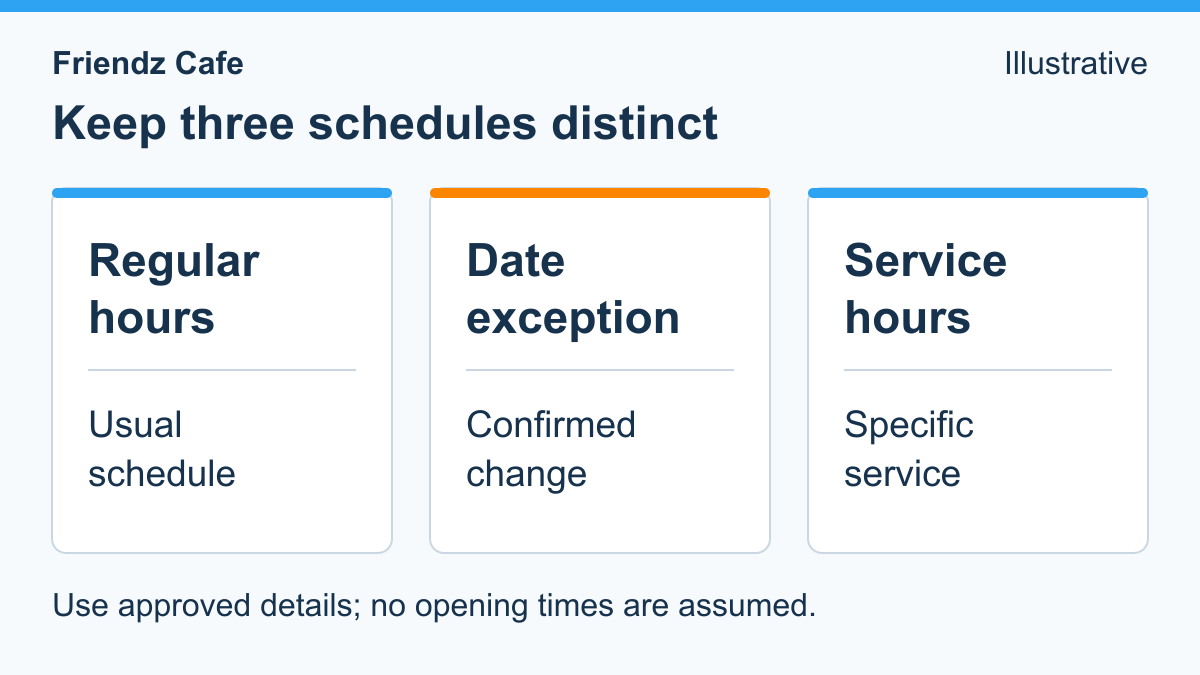
Keep Regular Hours, Date Exceptions and Service Hours Separate
A weekly schedule should not silently answer every date-specific question. Google’s special-hours guidance distinguishes holiday or event exceptions from regular hours. Its More hours guidance separately covers hours for particular services, such as pickup. Those are useful distinctions for an answer sheet, not evidence that any particular cafe offers a service or has a verified profile.
Give the schedule an owner. Before staff reuse a saved answer, that person should resolve conflicts between the cafe’s approved schedule and a date exception. Where the business maintains several public channels, note which ones need an update when a change is approved. Do not fill a missing entry with a likely-looking time.
The customer may also mean something different from the first question asked. “Are you open?” might concern the dining room, collecting an agreed order, or reaching someone by telephone. Ask a short clarifying question when it changes the answer. Avoid collecting contact details simply to share information that is already public.
Example reply when the date is unresolved: “The team needs to confirm the hours for that date. Please use the cafe’s published contact route for confirmation.” Replace that route only with one the business has approved. Do not add “we will reply shortly” unless there is a supported service commitment behind it.
Collect a Catering Enquiry Without Confirming an Order
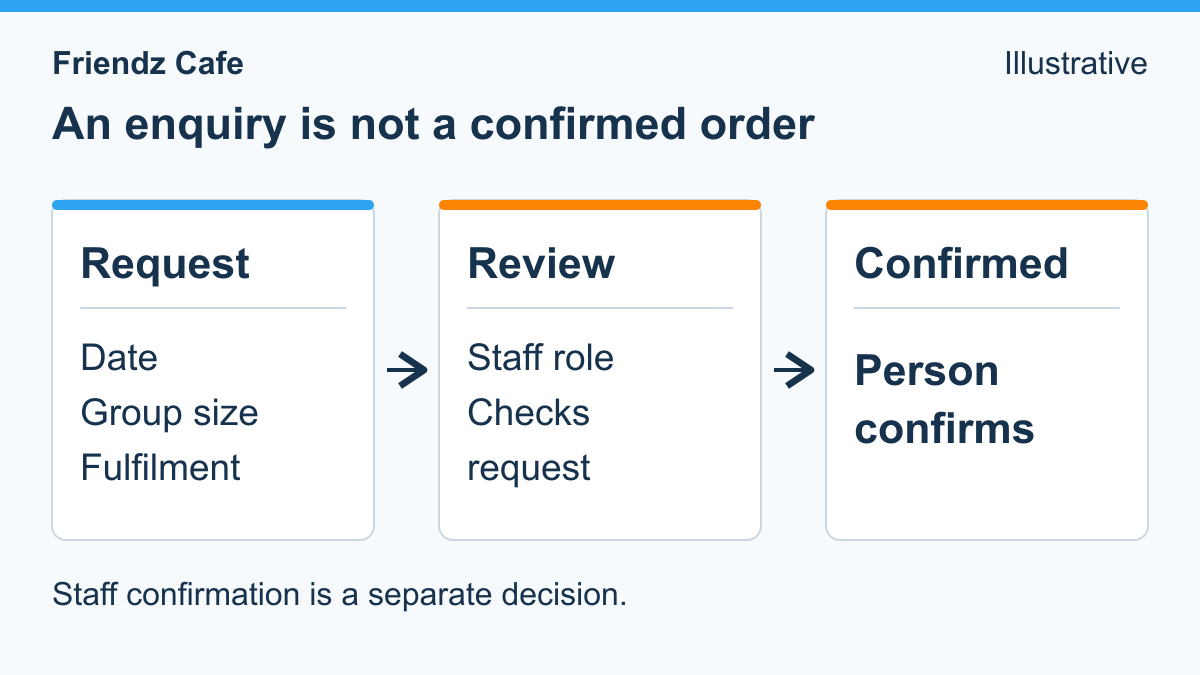
If the cafe accepts catering enquiries, decide what the team needs to assess a request before writing the questions. A requested date, approximate group size, collection or delivery preference, broad menu need and a preferred contact method may be useful. They are suggested fields, not requirements every cafe must adopt. Leave out anything that has no clear operational purpose.
Make the distinction between a request and an agreement visible. Receiving a message does not establish that the kitchen has capacity, the requested food is available, delivery is feasible, or a price has been accepted. A customer should not have to infer that distinction from small print after being told a booking is confirmed.
Example enquiry acknowledgement: “Thanks for your catering enquiry. The team needs to check availability and the menu before confirming. Please share the requested date, approximate group size and whether you need collection or delivery through the cafe’s approved contact route.” This is example wording for a business to adapt, not a live form, a monitored inbox or an offer from this website.
Keep the working states simple: requested, awaiting details, under staff review, and confirmed by the authorized person. If the team declines or offers an alternative, record that outcome plainly. Do not let a saved reply move a request to confirmed just because all the requested fields are present.
A useful internal handoff note separates what the customer asked from what the cafe has agreed. For example: “Customer requested collection for an event; menu and availability not yet checked.” Avoid rewriting that as “Catering collection arranged.” Do not ask for payment-card details, identity documents or private medical history in this general enquiry worksheet.
Route Exceptions to Someone Who Can Make the Decision
Some questions need more than a saved answer. Assign a responsible role for unclear hours, unusual fulfilment requests, complaints, access questions, disputed payments and requests to speak with a person. Give the role a fallback when its usual holder is unavailable. A fallback can be another authorized role or an honest explanation of the next contact step; it should not be an invented immediate-response promise.
The FDA’s food-allergy information explains that some food-allergy reactions can become life-threatening. A general answer sheet is not a basis for guaranteeing an ingredient, preparation process or outcome. Follow the cafe’s approved staff procedure for the particular enquiry rather than turning generic text into a safety decision.
For an accessibility question, establish what the person wants to know and ask the responsible staff member to confirm the relevant facts. Do not promise that a venue or service meets a person’s needs from a generic description. Staff should also distinguish a customer’s observation from a technical diagnosis. The same recordkeeping distinction appears in recording a cafe comfort concern: capture the concern and next action without inventing the professional assessment.
Agree how the receiving person acknowledges a handoff. A message labelled “sent to the team” is not proof it was received, understood or resolved. The internal record should show who has the request, what remains undecided and what the customer has actually been told. Keep private details within the cafe’s approved access arrangements, not in a public answer sheet.
Choose a Simple Way to Maintain the Answers
Choose the method after defining the answers and exceptions. A paper sheet can suit a small team working in one place. A shared document can make revisions easier to distribute, provided someone controls the approved version. A shared inbox can keep a conversation and its handoff together. These are options to evaluate against the cafe’s actual work, not claims that any method is automatically faster or cheaper.
When considering a guided FAQ, check whether it can use only reviewed answers, recognize a request for a person and avoid presenting an enquiry as a confirmed order. Ask what happens when information is missing or out of date. Verify the exact account, channel, plan, supported actions and staff responsibilities instead of relying on a demonstration or a feature label.
If your cafe is considering a guided Facebook Messenger FAQ, use Messenger Bot’s business workflow guide to compare approved answers, request collection and human handoff. Confirm the exact Page, plan and supported actions before choosing a tool; a request is not a confirmed booking.
Disclosure: Friendz Cafe and Messenger Bot have common ownership.
The worksheet should remain useful whichever method is chosen. Do not hide ordinary opening-hours or menu information behind an unnecessary signup. Keep a clear path to a person, and do not enable ordering, payment or automatic replies merely because a draft workflow contains those labels.
Check the Question-to-Person Path Before Relying on It
Walk through example questions with the people who will maintain the answers and receive exceptions. These are suggested internal checks, not a claim that the website or a particular product has already passed them. Use fictional details and avoid sending test requests to real customers.
- Ask about a normal day, a holiday and a date for which no exception is recorded.
- Ask about collection when the dining-room schedule is different.
- Request a menu item whose current availability has not been checked.
- Submit an incomplete catering enquiry and confirm that no order is accepted automatically.
- Ask an allergy or access question and check that it reaches the responsible person without an invented assurance.
- Ask for a person directly, including when the usual duty role is unavailable.
- Change an approved answer and check that old copies are no longer presented as current.
- Follow the handoff through receipt and review, not just the first acknowledgement.
Record what each check showed and what needs to change. If a reply cannot be supported, simplify it to the known information and next step. When a schedule, menu, contact route or responsibility changes, update the answer sheet and the affected public information through the cafe’s normal review process.
Start with a small set of approved answers that staff can maintain. Give unresolved items an owner, keep requests distinct from confirmations, and check the real handoff before expanding the system. A useful reply is accurate about both what the cafe knows and what a person still needs to decide.
Questions Cafe Teams Ask About Reliable Replies
What should a cafe answer without collecting contact details?
Share approved public information such as the current hours or menu without making personal details a condition of access. Collect contact information only when the cafe has a clear reason to follow up on the particular request.
How should holiday hours differ from the usual schedule?
Use the confirmed date-specific exception rather than assuming that the weekly schedule applies. Keep regular hours, date exceptions and relevant service hours separately reviewed so staff can identify the applicable answer.
Does a catering enquiry confirm an order?
No. Staff must check the requested date, capacity, menu, price and fulfilment before the authorized person confirms an agreement. An acknowledgement should describe the enquiry as a request, not an accepted booking.
Which questions should go directly to a person?
Route allergy or accessibility questions, unresolved information, disputes, exceptional event requests and direct requests for a person to the responsible staff role. Do not invent a safety, eligibility, payment or availability decision.
Does a cafe need a chatbot to use this checklist?
No. An approved answer sheet, clear request states and named staff responsibilities can be used before choosing software. If a tool is considered, verify the exact account, channel, plan and supported workflow first.

0 Comments